
Exploring the iPhone 17’s features shows how crucial a detailed user manual is. The iPhone 17 user guide is a key tool. It helps users grasp the device’s full potential and use its features effectively.
For those new to the iPhone 17, a user guide is very helpful. It offers clear instructions on using the device, solving common problems, and personalizing it. This makes the iPhone 17 easier to use and more enjoyable.
In this article, I’ll show you how to find and download the iPhone 17 manual PDF. This ensures you have all the tools needed to get the most out of your device.
Understanding the iPhone 17 User Guide
To get the most out of your iPhone 17, it’s important to know what the user guide covers. The iPhone 17 User Guide is made to help you understand your device’s features and how to use them.
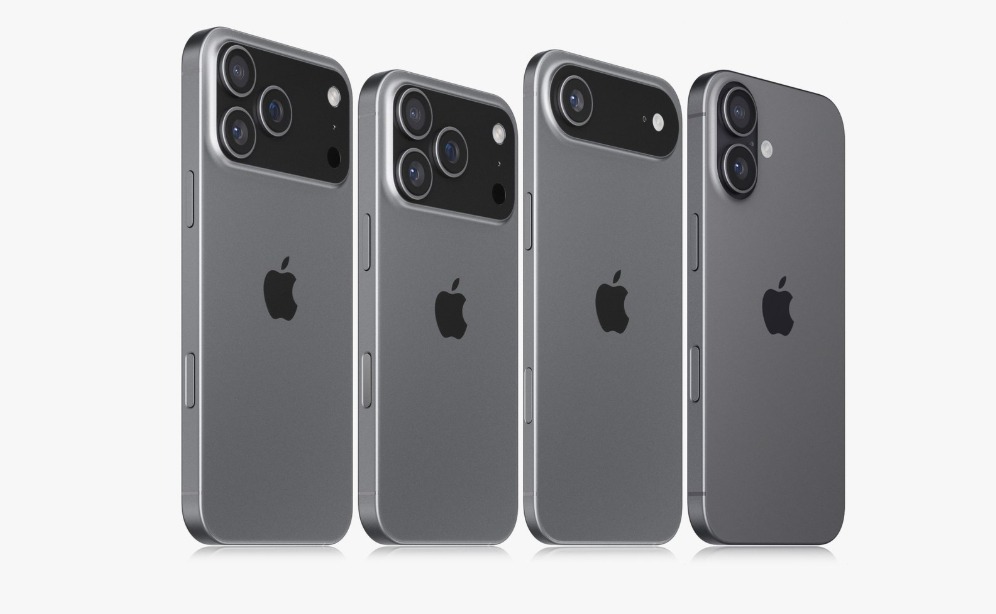
What Information Does the Guide Contain?
The guide has step-by-step instructions for using your device. It covers setting it up, navigating, and fixing common issues.
Why You Should Download the Official Manual
Getting the official iPhone 17 User Guide is a smart move. It gives you the latest and most accurate info from the maker. It’s great for fixing problems and learning what your device can do. It’s a key tool for anyone wanting to learn more about their iPhone 17.
Where to Find the Official iPhone 17 User Guide PDF
You can find the iPhone 17 user manual in several ways. I’ll explain them below. The official guide has everything you need to know about your iPhone 17. It includes how to use it, troubleshooting tips, and more.
Apple Books App Method
One simple way to get the user manual is through the Apple Books App.
Searching Within the App
To find the guide, open the Apple Books App. Tap on the “Search” tab and type “iPhone 17 user manual.” The official manual should show up. You can then download it to your device.
Downloading for Offline Reading
After finding the iPhone 17 user manual in the Apple Books App, you can download it. This is great for reading in places with no internet.
Apple’s Official Support Website
You can also get the user manual from Apple’s Official Support Website. There’s a section for iPhone 17 support documents, including the user manual. Just visit the site, search for “iPhone 17 user manual,” and download the PDF.
Using the Tips App on Your iPhone
The Tips App on your iPhone is another place to find iPhone 17 tips. It doesn’t have the full user manual but offers useful tips. These tips can help you get the most out of your iPhone 17.
By using these methods, you can easily find the iPhone17 user manual and other resources. This ensures you understand your device’s features and capabilities fully.
Step-by-Step Download Instructions for iPhone 17 User Guide
Getting the iPhone17 User Guide is easy. You can do it on your iPhone or a computer. The guide is in PDF, making it easy to read on different devices.
Method 1: Direct Download on Your iPhone
Downloading the guide on your iPhone is handy. You’ll need to use Safari.
Using Safari Browser
Open Safari and go to Apple’s support website. Look for “iPhone 17 User Guide” and find the PDF. Tap the download link to save it on your iPhone.
Managing Downloaded Files
After downloading, manage the file with the Files app. You can view, share, or move it as you like.
Method 2: Computer Download Process
Downloading the guide on a computer is also easy. You can use a Windows or Mac computer.
Windows Computer Instructions
On a Windows computer, open your browser. Go to Apple’s support website and search for the guide. Download the PDF and save it on your computer.
Mac Computer Instructions
Mac users follow a similar process. Use Safari or another browser to find and download the guide from Apple’s website. The file will go to your Downloads folder by default.
Transferring the PDF to Your iPhone
After downloading on your computer, transfer the guide to your iPhone. You can use iTunes, email it to yourself, or use cloud services like iCloud or Dropbox.
Effectively Using the User Guide
To get the most out of your iPhone 17, it’s key to know how to use the user guide well. The guide covers everything from basic to advanced features.
Understanding the Guide’s Organization
The iPhone 17 user guide is easy to follow. It starts with the basics, like setting up your iPhone and navigating. Then, it moves on to more advanced topics, like customizing settings and using specific features.
Using Search Functions to Find Information
Using the search function in the guide is very efficient. It helps you find instructions or troubleshooting tips quickly. This makes it easier to use your iPhone.
Creating Bookmarks for Important Sections
Creating bookmarks for important sections is a great idea. It lets you go back to pages you need without searching. This makes following instructions or revisiting topics easier.
By following these tips, you can get the most out of the iPhone 17 user guide. You’ll enjoy a better user experience.
Alternative Resources for iPhone 17 Instructions
There are many ways to learn more about your iPhone 17, beyond the official user guide PDF. You can find a wealth of information online. This can help you get the most out of your device.
Official Apple Video Tutorials
Apple has a collection of video tutorials for your iPhone 17. These videos cover everything from setting up your device to using advanced features. They are a great addition to the user guide.
Watching these tutorials can help you understand your device better. You’ll also learn how to fix common problems.
Third-Party Guides and Community Support
There are also many third-party guides and forums for iPhone 17 users. These resources share tips and tricks not found in the official manual. They also let you connect with other users for support and advice.
Using these resources can improve your iPhone 17 skills. You’ll also stay updated with the latest tips and practices.
Troubleshooting Guide Access Problems
I’m here to help you fix common problems with the iPhone 17 User Guide. This guide is a valuable resource, but sometimes, accessing it can be tricky. You might face issues like trouble downloading or opening the PDF file.
PDF Download and Opening Issues
Having trouble downloading the guide? First, check your internet connection. Make sure you have enough space on your device. If the guide won’t open, try updating your PDF viewer or checking for iPhone software updates.
It’s possible the file is the problem. Try downloading the iPhone 17 manual again from Apple Support or Apple Books.
Compatibility Problems with Different Devices
The iPhone 17 User Guide works on many devices, but sometimes, it doesn’t. If you’re using a non-Apple device, make sure you have a compatible PDF viewer.
Having trouble on an iPhone or iPad? Try restarting your device or checking for updates. This might fix the problem and let you access the guide easily.
Now that you know how to find and download the iPhone Air User Guide, it’s time to dive in. The official iPhone 17 user manual is a key resource. It helps you get the most out of your device.
By following the steps in this article, you can easily find the iPhone 17 instructions. This lets you use your iPhone 17 to its fullest. Whether you want to learn new features or fix common problems, the user manual is here to help.
I suggest you download the guide and explore your iPhone 17’s features. With the official user manual, you’ll master your device. You’ll enjoy a smooth and easy user experience.
6 thoughts on “How to Find and Download iPhone 17 User Guide PDF”